Your long videos are full of moments worth sharing.

Find the moments worth sharing. Turn them into polished short-form videos. All without uploading your footage.

Free for 7 days, every feature, no card. Other platforms and versions

An hour of conversation. Somewhere in it, your next clips.

Clipsmithy listens to every word and finds what stands on its own.

Each moment is cut, framed for vertical and captioned.

Three clips, ready to post. Made on your computer.

01The app

A week of posts, on one screen.

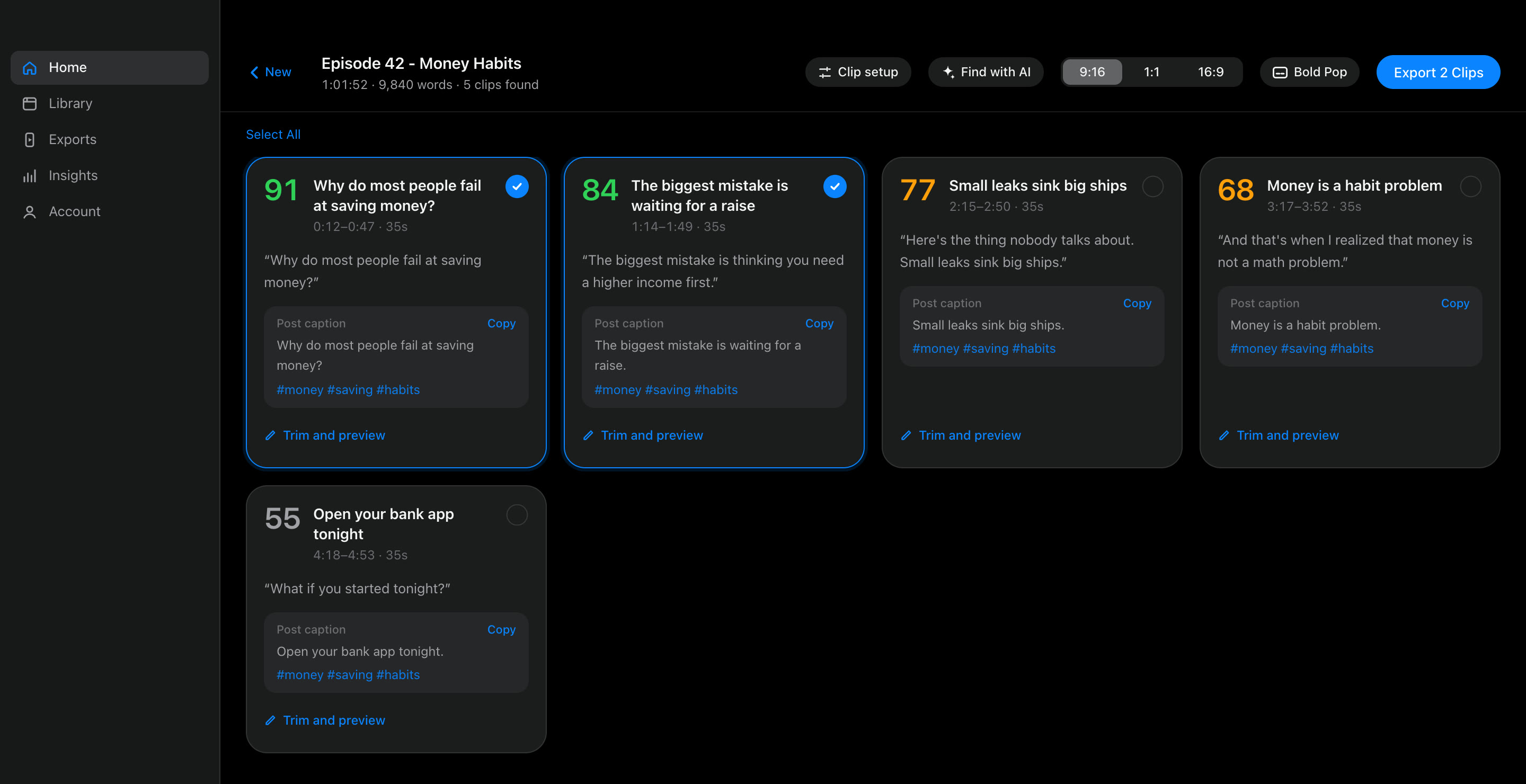
Every clip Clipsmithy finds, ranked, titled and captioned. Trim it, restyle it, export it, or ask for different moments. The transcript is reused, so changes take seconds.

The Clipsmithy clips screen: clips from a one-hour episode, each with a score, title, opening line and post caption.1234
1Score

How strong the moment is, 0–99, so the best rise to the top.

2Post caption

Ready-to-paste text with hashtags from what was actually said.

3Clip setup

Prompt, clip length and count. Change them any time and find again.

4Format and captions

9:16, 1:1 or 16:9, and eleven caption styles, applied on export.

02Growth

Post every day without filming more.

Audiences grow with consistency. Clipsmithy turns what you already record into a steady stream of posts for TikTok, Instagram Reels and YouTube Shorts.

Typical length

With Auto, Clipsmithy finds 5 to 15 clips per video depending on its length. You can choose the number yourself.

130clips a month
130TikTok posts
130Reels posts
130Shorts posts

About 4 new clips a day.

Video a cloud clipper would bill you for520 min a month
Clipsmithy, however much you clip$4.92 a month

Clipsmithy makes the clips; how they perform depends on your content and each platform. We don't promise views, followers or income. Try it free for 7 days and see what your own videos give you.

03Inside

Studio tools, running on your desk.

01 · Clip discovery

Finds the moments that stand on their own.

A hook in the first seconds, one clear idea, a clean ending. Every clip is scored 0–99. Tell it what you're after and it looks for that.

Prompt Pricing advice and the first hirepricinghire
91
Why we doubled our price and lost no one
12:04 – 12:41 · 37 s
86
The first hire I almost got wrong
31:18 – 31:57 · 39 s
74
Advice I'd give myself at year one
44:02 – 44:33 · 31 s
58
What the spreadsheet didn't show us
52:40 – 53:12 · 32 s

Example results for a one-hour founder interview.

02 · Face tracking

Keeps the speaker in frame.

Faces are found on your computer. The vertical frame eases with small movements and cuts cleanly when the shot changes to someone new.

Diagram: a 9:16 frame following a two-person 16:9 shot.

03 · Captions

Every word lands on time.

Eleven styles with word-by-word highlighting, burned in exactly as you preview them. Add any .ttf or .otf font.

Bold Pop
This changed everything
Neon
Small leaks sink ships
Ocean
Start with what you have
04 · Transcription

Whisper, on your machine.

Word-level timestamps from speech recognition that runs locally, on the GPU with Apple silicon. No upload, no internet needed.

0:12.48 Why0:12.71 do0:12.86 most0:13.10 people0:13.52 fail0:13.80 at0:13.92 saving0:14.31 money?

05 · Your AI, or none

Bring a key, a local model, or neither.

The built-in finder is free and offline. With your own key, only transcript text goes to the provider you pick, and the estimated cost appears before every run.

Built-in finderFree, offline
Anthropic ClaudeYour key
OpenAI GPTYour key
Google GeminiYour key
DeepSeekYour key
Ollama or LM StudioFree, local

04Privacy

Your footage stays yours.

Everything Clipsmithy does with your video, and the only things that ever leave your computer.

Always on your computer

  • Your videoRead from your drive, never uploaded
  • TranscriptionWhisper, word by word
  • Clip findingThe built-in finder runs offline
  • Face detectionFor reframing, on device
  • Captions and renderingBurned in with FFmpeg
  • Projects and exportsIn your library and Movies folder
  • API keysIn your system keychain

Leaves only when you choose

  • If you pick an AI providerTranscript text, to that provider

    Sent with your own key to Anthropic, OpenAI, Gemini or DeepSeek. Ollama keeps it on your computer.

  • If you turn on cloud transcriptionAudio, to OpenAI

    The soundtrack only, with your key, after you confirm the cost.

  • For your licenseA license check, to Clipsmithy

    Your license key, a device ID and the computer's name, about once a week. Optional crash reports have keys and file paths removed.

05Pricing

One price. Unlimited clips.

$59 per year

$4.92 a month, billed once a year. $36.88 less than monthly.

$7.99 per month

Billed monthly. Cancel any time.

Or start the free trial: 7 days, every feature, no card.

Included in both

  • Videos and minutesUnlimited
  • Clip findingAI or built-in
  • Reframing9:16, 1:1, 16:9
  • Caption styles11, plus your fonts
  • Computers2, Mac or Windows
  • UpdatesEvery release
  • WatermarkNever

Secure checkout by Stripe. Change plan or cancel from your account. Prices in USD.

Typical cloud clippers

$15–$29 a monthfor paid plans, with credits per minute of video uploaded.

A weekly 2-hour podcastis about 520 minutes a month, beyond many plans. Same price here.

Your footageis uploaded to their servers. Here it never leaves your computer.

Based on published 2026 plans of popular AI clipping services. Check each service for current terms.

06Questions

Before you download.

Do I need an AI account or API key?

No. The built-in clip finder and on-device transcription work offline, with no key. If you add your own Claude, GPT, Gemini or DeepSeek key, or run a local model with Ollama, the AI picks the clips instead, and you see the estimated cost before every run.

Is my video uploaded anywhere?

No. Your video file never leaves your computer. If you choose an AI provider, it receives the transcript text, with your key. If you turn on cloud transcription, OpenAI receives the audio. Both are off until you choose them.

What computer do I need?

A Mac with Apple silicon or Intel on macOS 13 or later, or a 64-bit PC with Windows 10 or 11. Transcription uses the GPU on Apple silicon; everything also runs on the CPU.

How many computers can I use?

Two at a time, Mac or Windows. Move a license between computers from your account page or the app.

What happens if I cancel?

You keep exporting until the end of the period you paid for. After that, exports pause; your projects, transcripts and clips stay on your computer.

Can I clip YouTube videos?

Yes: paste a link to your own video, or one you have permission to use. Age-restricted videos can use your browser's YouTube sign-in, only when YouTube asks for it.

Your next clips are already recorded.